PhonePe Car Insurance
A redesign of how you buy car insurance on PhonePe, so you know what you're paying for before you pay. I designed it in Figma and built it as a working Android app with Claude.
- Role
- Design and build
- Team
- Solo, with Claude
- Mentor
- Rajat Patel
- Timeline
- Aug to Sep 2026
- Status
- Android APK
A self-initiated concept. I'm not affiliated with PhonePe.
Why car insurance
While exploring PhonePe, I found out they also sell car insurance. That matters more than it sounds.
PhonePe's main use, UPI payments, earns them nothing from the person paying. Insurance is one of the places they actually make money. So this flow matters to the business, and it was the part of the app that felt the most rushed.
earned from you, every time you pay
every year you renew
What's wrong with the current flow
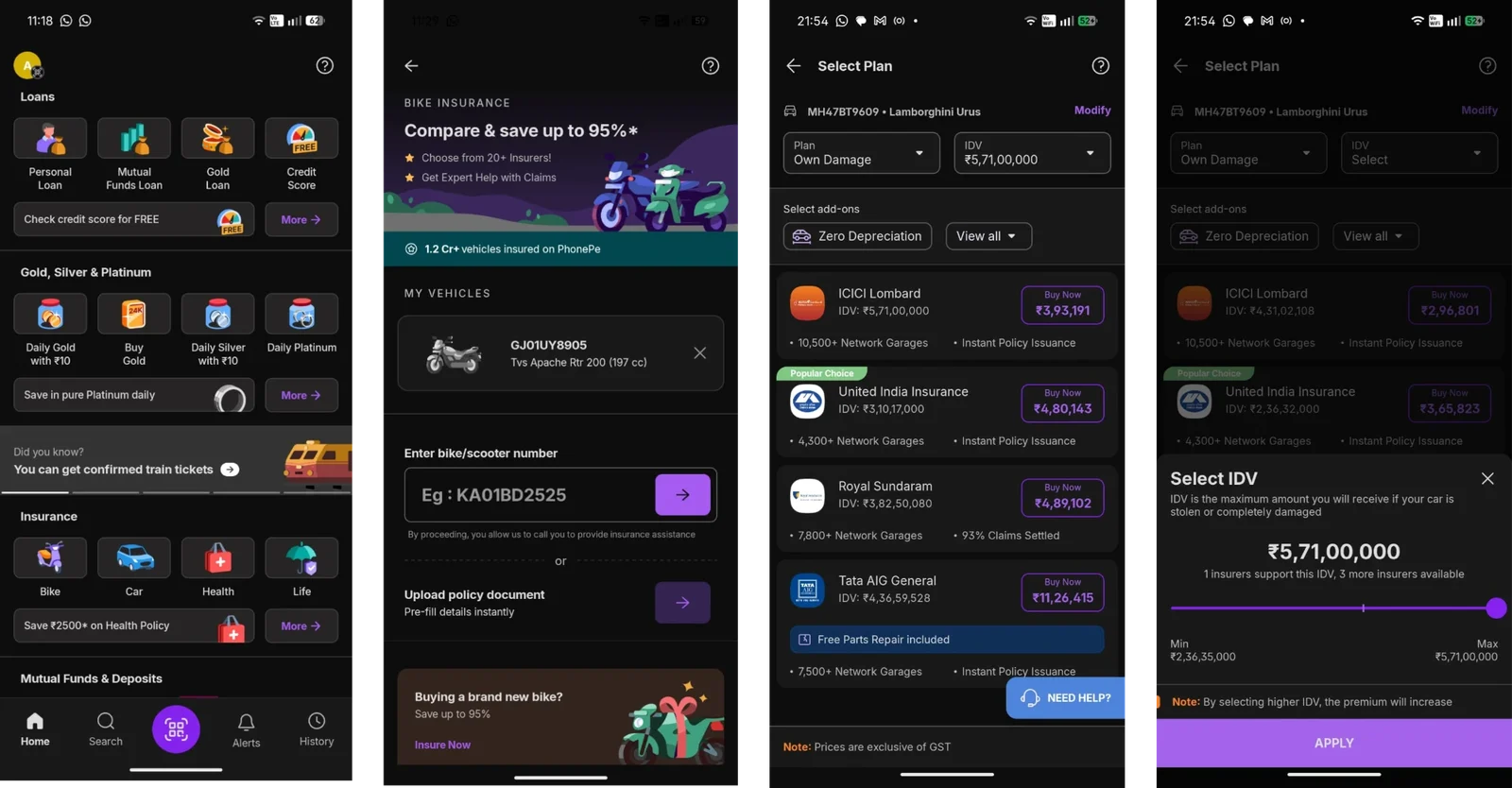
From Home to picking an IDV, as it works today.
- 1
You never confirm it's your car
You type the number and land straight on a list of prices. Nothing says "this is the car we found", so I wasn't sure the vehicle was even mine.
- 2
You see nothing about your current policy
Not your plan, and not when it expires.
- 3
Decisions are made for you
The listing opens with a plan already picked, and terms like IDV and Own Damage are never explained.
- 4
The default IDV can cost you half your car
IDV is what you get if your car is stolen or written off. Insurers will cover more than double the lower end of the range. If you don't know what IDV means, you settle for half your car's value, when a slightly higher premium would cover all of it. That should be your decision.
₹2.36 Cr lowesthighest ₹5.71 Cr - 5
The listing is cluttered
Every bit of space is used, so prices, IDVs, garages and badges all compete with each other.
Slow down where you decide
Take your time at the two moments that matter, which car and how much cover, and get out of the way everywhere else.
- Your number
- Confirm your car
- Choose your IDV
- Choose your plan
- Compare insurers
- Customise
- Your details
- Review and buy
- You're covered
Key decisions
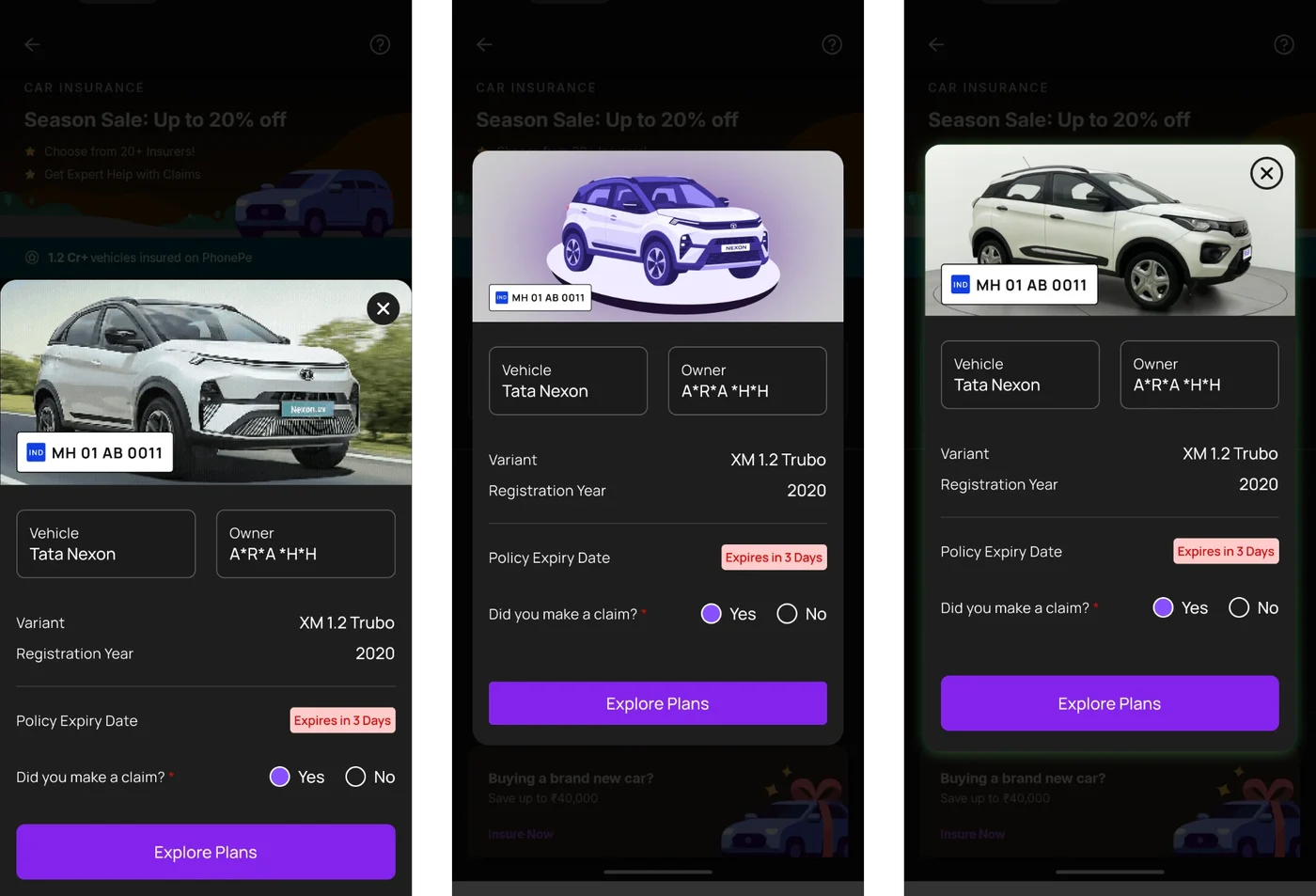
Confirm the car before anything else
The number plate you typed lifts off the input, searches, and lands on your car. There's only ever one plate on screen, so it reads as your number finding its car.
Then you see the car, the masked owner name, the variant and when your current policy expires, and one question: did you make a claim this year? A claim lowers your car's value, so that answer sets where your IDV starts.
IDV you can see
IDV gets a screen of its own. As you drag, the car fills with colour from left to right, the value updates, and you see how many insurers will cover that amount.
A dot marks the recommended value, and the slider snaps to it with a small vibration. A bigger IDV looks like more of your car being covered, without you reading a definition.
Plan and IDV are equal decisions
The plan decides what is covered. IDV decides how much. So they're two steps with the same weight.
For the plan, an accident does the explaining. With Comprehensive, everything is in colour. Switch to Third party and only the other people and their bike stay coloured, because that's all you're covering.
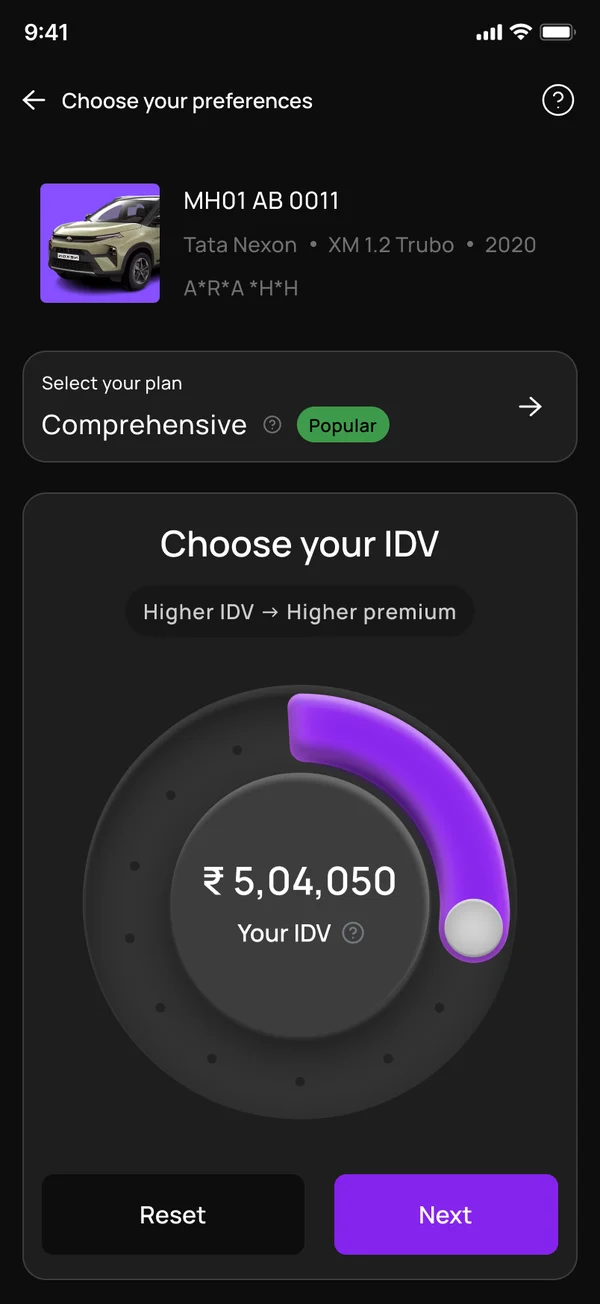
My first version put IDV in a big dial and the plan in a small row above it. That told people IDV mattered more, which isn't true.
A listing you can read
Six insurers. Each card has one price, one IDV, the garage network and how many claims they settle, and nothing else competing for space.
You can sort by most popular, highest claim %, most garages or lowest price. The help icon opens a short glossary, so you're never left guessing what a term means.
Pay as you drive, explained
In interviews, many people didn't understand it. So it gets an explainer, and the step asks how much you drive a year, with a slider and your odometer reading. This part is still being built.
The price is always in view
Each add-on says who it's worth it for. Personal Accident cover is marked "Mandatory by law" but can be switched off if you already have it. The total updates as you change anything, and "View Breakdown" shows where every rupee goes.
Change your mind without starting over
From review, "Change plan" asks what to change: insured value, plan type or insurer, and brings you back. Your PAN and date of birth are never asked twice.
You're covered
The last screen is a ticket with your car, plate, insurer and policy number.
Download saves a real policy PDF to your phone, modelled on an actual policy document. Share sends the PDF with a message. And since the policy has "already been emailed", tapping your email opens your inbox.
Testing on real phones
I built it as an app so it could be installed and used, not clicked through.
Stuck on a Samsung FE
On my mentor Rajat's phone, the "Explore Plans" button fell off the bottom of the screen with no way to scroll. I fixed it, then checked every screen and found two more like it.
Covered on a Pixel 10
The gesture bar sat over the buttons. More room at the bottom fixed it.
Plates that start with numbers
I'd only allowed the standard format, but EV and BH-series plates start with digits. The field now takes any plate.
How it was made
About fifteen days of design in Figma, then built screen by screen with Claude, in the same rounds of feedback.
Design in Figma
Every screen, with the app's own type and colour tokens, so the build could match it exactly.
Build with Claude
React Native and Expo, one screen at a time, measured against the Figma frames.
Put it on phones
An APK on my phone and my mentor's. What broke there became the next round.
The build
- 5–7 Sep
- The whole flow, from your number to "You're covered"
- 9 Sep
- Rajat's feedback: any plate, a real sortable list, no details asked twice
- 11–12 Sep
- The new success ticket, the policy PDF and the price breakdown
- 13 Sep
- Your details split into steps, and Pay as you drive redesigned
- 17 Sep
- Change plan stops sending you back through the flow
- 23 Sep
- Add-ons you pick show up in the insurer comparison
What I'd measure if it shipped
- 1How many people who enter a number go on to buy.
- 2Where people drop off, step by step.
- 3How many change the IDV from the recommended value, and in which direction.
- 4How often "Change plan" is used, and whether those people still buy.
What I learned
The current flow is short because it decides for you: the plan is already picked and the IDV is already set. Mine is longer. You confirm your car, then choose your cover, then your plan. I learned that a longer flow isn't always one people leave. When the extra steps are the ones where you decide, they build trust, and that trust is what keeps someone going until they pay.